Business Process Diagram Family
BPMN-inspired business process diagrams with 31 node types covering events, tasks, gateways, roles, data objects, and rule flows.
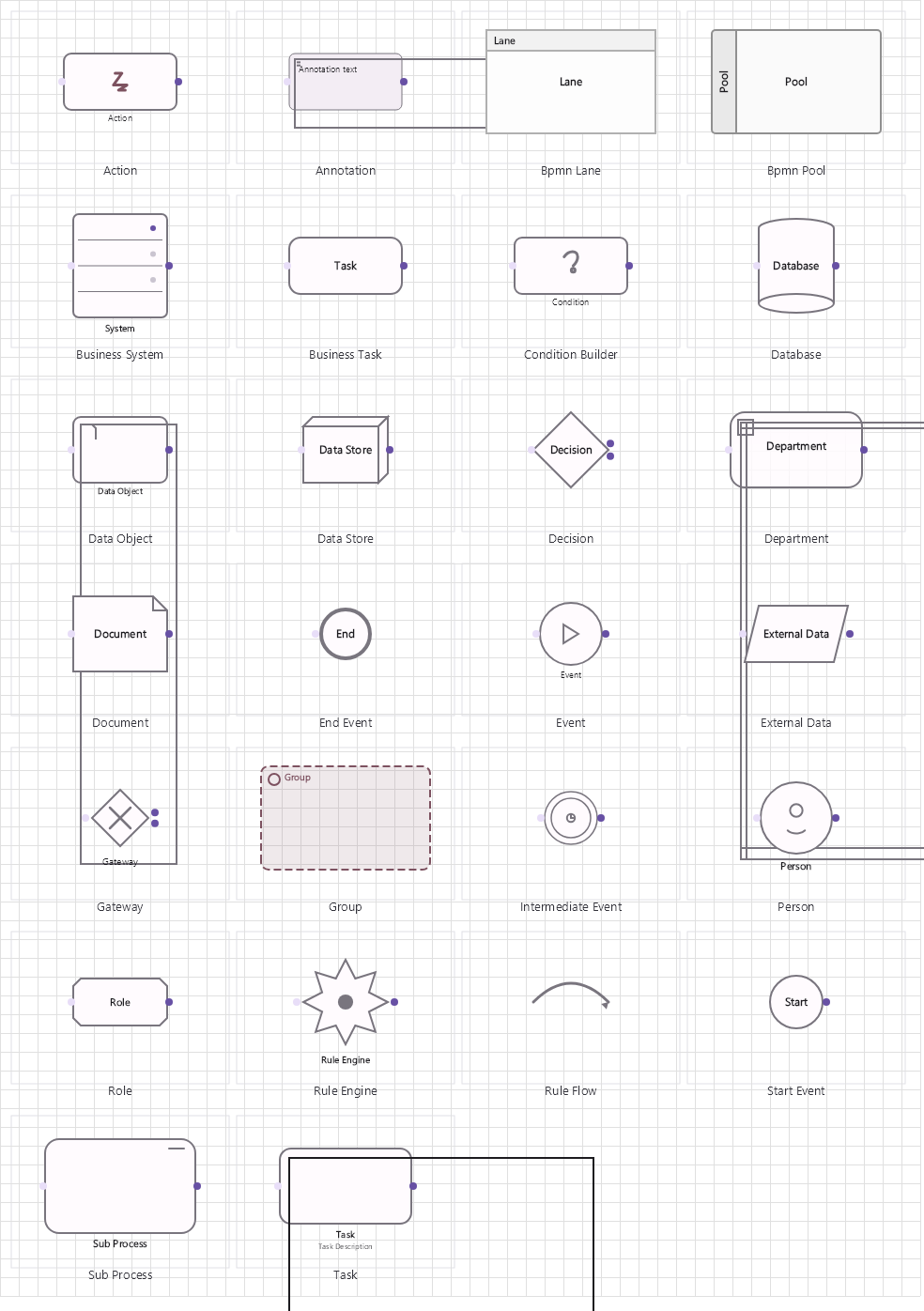
Overview
Base Control: BusinessControl : MaterialControl
Namespace: Beep.Skia.Business
The BusinessControl is the root control for this diagram family. It inherits MaterialControl and provides shared port management, styling, and template methods for all nodes in the family.
This family contains 23 node types.
Node Types
| Node Class | Shape | Description |
|---|---|---|
StartEvent | Circle (thin) | Process start trigger. |
EndEvent | Circle (thick) | Process end/termination. |
TaskNode | Rounded rectangle | Generic task/activity. |
BusinessTask | Rounded rectangle + icon | Business task with role assignment. |
ActionNode | Rounded rectangle | Manual/user action step. |
Decision | Diamond | Exclusive gateway (XOR) decision point. |
Gateway | Diamond with icon | Generic gateway (AND/OR/XOR). |
SubProcess | Rounded rectangle + expand icon | Expandable sub-process with child diagram. |
EventNode | Circle (intermediate) | Intermediate event (timer, message, error, signal). |
Annotation | Open bracket with text | Text annotation for any element. |
Database | Cylinder | Database data store. |
DataStore | Open-ended rectangle | Data repository (XML, file, document store). |
DataObject | Document with folded corner | Data object passed between activities. |
Document | Document icon | Document/report artifact. |
ExternalData | Cloud/database | External data source connection. |
Department | Swimlane | Organizational department/unit swimlane. |
Person | Person icon | Individual actor/role. |
Role | Tag/label | Role definition for task assignment. |
Group | Border/container | Group of related activities. |
BusinessSystem | Server/system box | IT system/service performing automated tasks. |
RuleEngine | Hexagon/gear | Business rules engine node. |
RuleFlow | Arrow with condition | Conditional flow governed by business rules. |
ConditionBuilder | Expression builder | Visual condition/expression builder. |
StartEvent
Process start trigger.
| Shape | Circle (thin) |
|---|---|
| Input Ports | 0 |
| Output Ports | 1 |
EndEvent
Process end/termination.
| Shape | Circle (thick) |
|---|---|
| Input Ports | 1+ |
| Output Ports | 0 |
TaskNode
Generic task/activity.
| Shape | Rounded rectangle |
|---|---|
| Input Ports | 1 |
| Output Ports | 1 |
BusinessTask
Business task with role assignment.
| Shape | Rounded rectangle + icon |
|---|---|
| Input Ports | 1 |
| Output Ports | 1 |
ActionNode
Manual/user action step.
| Shape | Rounded rectangle |
|---|---|
| Input Ports | 1 |
| Output Ports | 1 |
Decision
Exclusive gateway (XOR) decision point.
| Shape | Diamond |
|---|---|
| Input Ports | 1 |
| Output Ports | 2+ |
Gateway
Generic gateway (AND/OR/XOR).
| Shape | Diamond with icon |
|---|---|
| Input Ports | 1+ |
| Output Ports | 1+ |
SubProcess
Expandable sub-process with child diagram.
| Shape | Rounded rectangle + expand icon |
|---|---|
| Input Ports | 1 |
| Output Ports | 1 |
EventNode
Intermediate event (timer, message, error, signal).
| Shape | Circle (intermediate) |
|---|---|
| Input Ports | 1 |
| Output Ports | 1 |
Annotation
Text annotation for any element.
| Shape | Open bracket with text |
|---|---|
| Input Ports | 0 |
| Output Ports | 0 |
Database
Database data store.
| Shape | Cylinder |
|---|---|
| Input Ports | 1 |
| Output Ports | 1 |
DataStore
Data repository (XML, file, document store).
| Shape | Open-ended rectangle |
|---|---|
| Input Ports | 1 |
| Output Ports | 1 |
DataObject
Data object passed between activities.
| Shape | Document with folded corner |
|---|---|
| Input Ports | 1 |
| Output Ports | 1 |
Document
Document/report artifact.
| Shape | Document icon |
|---|---|
| Input Ports | 1 |
| Output Ports | 1 |
ExternalData
External data source connection.
| Shape | Cloud/database |
|---|---|
| Input Ports | 1 |
| Output Ports | 1 |
Department
Organizational department/unit swimlane.
| Shape | Swimlane |
|---|---|
| Input Ports | 0 |
| Output Ports | 0 |
Person
Individual actor/role.
| Shape | Person icon |
|---|---|
| Input Ports | 1 |
| Output Ports | 1 |
Role
Role definition for task assignment.
| Shape | Tag/label |
|---|---|
| Input Ports | 1 |
| Output Ports | 1 |
Group
Group of related activities.
| Shape | Border/container |
|---|---|
| Input Ports | 0 |
| Output Ports | 0 |
BusinessSystem
IT system/service performing automated tasks.
| Shape | Server/system box |
|---|---|
| Input Ports | 1 |
| Output Ports | 1 |
RuleEngine
Business rules engine node.
| Shape | Hexagon/gear |
|---|---|
| Input Ports | 1 |
| Output Ports | 1 |
RuleFlow
Conditional flow governed by business rules.
| Shape | Arrow with condition |
|---|---|
| Input Ports | 0 |
| Output Ports | 0 |
ConditionBuilder
Visual condition/expression builder.
| Shape | Expression builder |
|---|---|
| Input Ports | 1 |
| Output Ports | 1 |
Connection Points
Every node in this family exposes connection points (ports) for linking to other nodes. Port positions are computed lazily by LayoutPorts(), which runs when MarkPortsDirty() flags the layout as stale after a move or resize.
| Node Class | Input Ports | Output Ports | Extra |
|---|---|---|---|
StartEvent | 0 | 1 | — |
EndEvent | 1+ | 0 | — |
TaskNode | 1 | 1 | — |
BusinessTask | 1 | 1 | — |
ActionNode | 1 | 1 | — |
Decision | 1 | 2+ | — |
Gateway | 1+ | 1+ | — |
SubProcess | 1 | 1 | — |
EventNode | 1 | 1 | — |
Annotation | 0 | 0 | — |
Database | 1 | 1 | — |
DataStore | 1 | 1 | — |
DataObject | 1 | 1 | — |
Document | 1 | 1 | — |
ExternalData | 1 | 1 | — |
Department | 0 | 0 | — |
Person | 1 | 1 | — |
Role | 1 | 1 | — |
Group | 0 | 0 | — |
BusinessSystem | 1 | 1 | — |
RuleEngine | 1 | 1 | — |
RuleFlow | 0 | 0 | — |
ConditionBuilder | 1 | 1 | — |
Connection Conventions
When building diagrams with this family, follow these conventions:
- Start events have no inputs; end events have no outputs
- Gateways route flow based on conditions
- Swimlanes (Department) partition the diagram horizontally
- Data objects connect to activities via dashed association lines
Usage Example
Complete example showing creation, node placement, and connection:
C# Example
var biz = new BusinessControl
{
    X = 50, Y = 50,
    Width = 700, Height = 500
};
drawingManager.AddComponent(biz);

var start = new StartEvent { X = 80, Y = 200, EventName = "Order Received" };
var task = new BusinessTask { X = 220, Y = 200, TaskName = "Validate Order" };
var decision = new Decision { X = 380, Y = 200, DecisionName = "Valid?" };
var sys = new BusinessSystem { X = 200, Y = 350, SystemName = "ERP" };
var end = new EndEvent { X = 550, Y = 200, EventName = "Order Processed" };

drawingManager.AddComponent(start);
drawingManager.AddComponent(task);
drawingManager.AddComponent(decision);
drawingManager.AddComponent(sys);
drawingManager.AddComponent(end);

drawingManager.ConnectComponents(start.OutPoints[0], task.InPoints[0]);
drawingManager.ConnectComponents(task.OutPoints[0], decision.InPoints[0]);
drawingManager.ConnectComponents(decision.OutPoints[1], sys.InPoints[0]);
BPMN Import and Export
The family round-trips BPMN 2.0 XML so diagrams can be exchanged with process-modeling tools:
| Member | Type | Description |
|---|---|---|
BpmnExporter.Export(components, lines, processName) | string | Serializes the diagram to BPMN XML. |
BpmnImporter.Parse(xml) | BpmnImportResult | Parses XML without touching the canvas. |
BpmnImporter.LoadInto(manager, xml) | BpmnImportResult | Parses and materializes the process on a canvas. |
BpmnImportResult.ProcessName | string | Name of the imported process. |
BpmnImportResult.Components / Flows | lists | Created nodes and sequence flows. |
BpmnImportResult.Warnings | List<string> | Non-fatal issues encountered while parsing. |
// Export the current diagram
var exporter = new BpmnExporter();
string xml = exporter.Export(drawingManager.GetComponents(), drawingManager.GetLines(), "Order Process");
File.WriteAllText("process.bpmn", xml);

// Import into a fresh canvas
var importer = new BpmnImporter();
var result = importer.LoadInto(drawingManager, File.ReadAllText("process.bpmn"));
foreach (var warning in result.Warnings)
    Console.WriteLine($"warning: {warning}");