Machine Learning Diagram Family
Machine learning pipeline diagrams with 20 node types covering data preparation, model training, evaluation, inference, and neural network architectures.
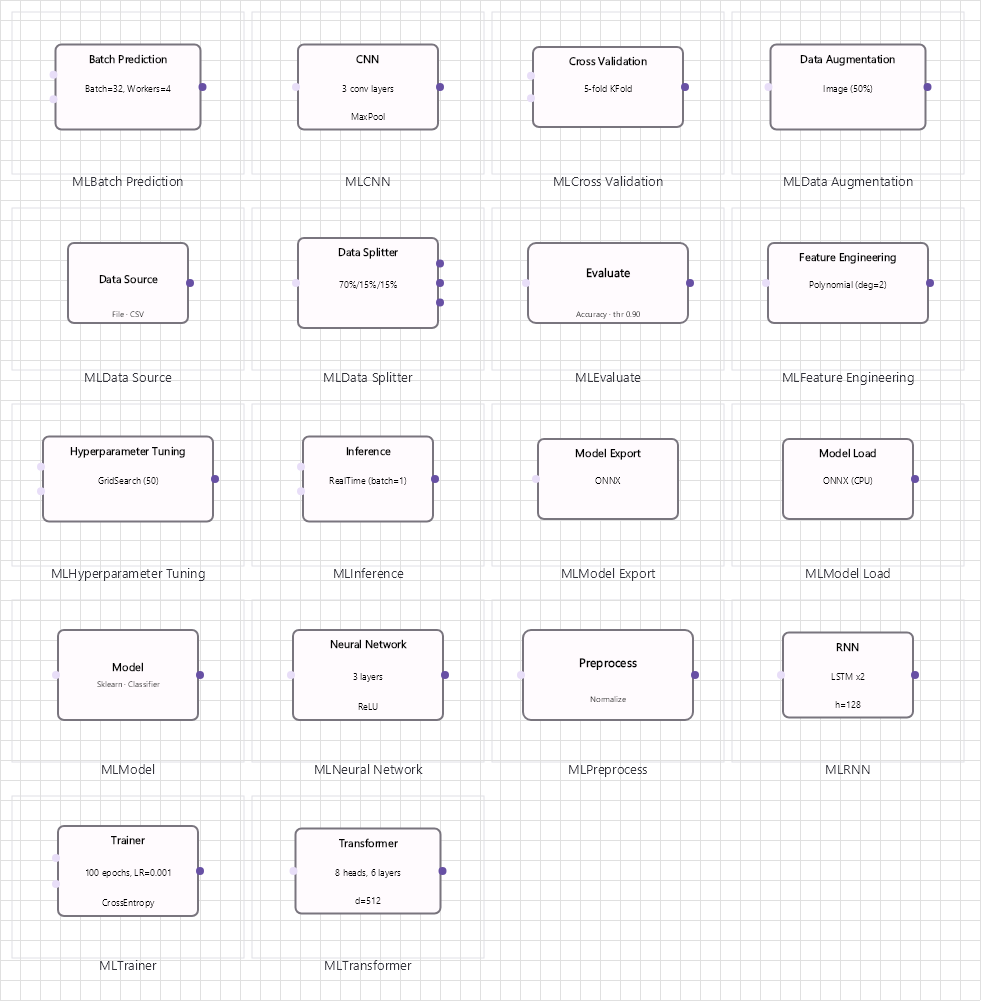
Overview
Base Control: MLControl : MaterialControl
Namespace: Beep.Skia.ML
The MLControl is the root control for this diagram family. It inherits MaterialControl and provides shared port management, styling, and template methods for all nodes in the family.
This family contains 18 node types.
Node Types
| Node Class | Shape | Description |
|---|---|---|
MLDataSourceNode | Database/table | Training/test data source with format, size, and schema. |
MLPreprocessNode | Gear/clean icon | Data preprocessing: normalization, encoding, imputation. |
MLFeatureEngineeringNode | Feature icon | Feature creation, selection, transformation. |
MLDataAugmentationNode | Multiply icon | Data augmentation (rotation, flip, noise, synthetic). |
MLDataSplitterNode | Split arrow | Train/validation/test split with configurable ratios. |
MLModelNode | Brain/model icon | ML model with hyperparameters: learning rate, layers, epochs. |
MLTrainerNode | Training icon | Model training node with optimizer, loss function, batch size. |
MLEvaluateNode | Checkmark/target | Model evaluation: accuracy, precision, recall, F1, ROC. |
MLInferenceNode | Forward arrow | Real-time inference/prediction node. |
MLBatchPredictionNode | Batch icon | Batch prediction on dataset. |
MLCrossValidationNode | K-fold icon | K-fold cross-validation with fold metrics. |
MLHyperparameterTuningNode | Tuning knob | Grid/random/Bayesian hyperparameter optimization. |
MLModelExportNode | Export/disk icon | Export model to ONNX, PMML, pickle, TensorFlow SavedModel. |
MLModelLoadNode | Import/disk icon | Load pre-trained model from file/registry. |
MLCNNNode | Convolution grid | Convolutional Neural Network: conv, pool, flatten, dense. |
MLRNNNode | Recurrent icon | Recurrent Neural Network: LSTM/GRU with sequence length. |
MLNeuralNetworkNode | Network layers | Dense/feedforward neural network with configurable layers. |
MLTransformerNode | Attention grid | Transformer architecture: attention, feedforward, layer norm. |
MLDataSourceNode
Training/test data source with format, size, and schema.
| Shape | Database/table |
|---|---|
| Input Ports | 0 |
| Output Ports | 1+ |
MLPreprocessNode
Data preprocessing: normalization, encoding, imputation.
| Shape | Gear/clean icon |
|---|---|
| Input Ports | 1 |
| Output Ports | 1 |
MLFeatureEngineeringNode
Feature creation, selection, transformation.
| Shape | Feature icon |
|---|---|
| Input Ports | 1 |
| Output Ports | 1 |
MLDataAugmentationNode
Data augmentation (rotation, flip, noise, synthetic).
| Shape | Multiply icon |
|---|---|
| Input Ports | 1 |
| Output Ports | 1 |
MLDataSplitterNode
Train/validation/test split with configurable ratios.
| Shape | Split arrow |
|---|---|
| Input Ports | 1 |
| Output Ports | 2-3 |
MLModelNode
ML model with hyperparameters: learning rate, layers, epochs.
| Shape | Brain/model icon |
|---|---|
| Input Ports | 1+ |
| Output Ports | 1+ |
MLTrainerNode
Model training node with optimizer, loss function, batch size.
| Shape | Training icon |
|---|---|
| Input Ports | 2 (data + model) |
| Output Ports | 1 (trained model) |
MLEvaluateNode
Model evaluation: accuracy, precision, recall, F1, ROC.
| Shape | Checkmark/target |
|---|---|
| Input Ports | 1 |
| Output Ports | 1 |
MLInferenceNode
Real-time inference/prediction node.
| Shape | Forward arrow |
|---|---|
| Input Ports | 2 (data + model) |
| Output Ports | 1 (predictions) |
MLBatchPredictionNode
Batch prediction on dataset.
| Shape | Batch icon |
|---|---|
| Input Ports | 2 |
| Output Ports | 1 |
MLCrossValidationNode
K-fold cross-validation with fold metrics.
| Shape | K-fold icon |
|---|---|
| Input Ports | 1 |
| Output Ports | 1 |
MLHyperparameterTuningNode
Grid/random/Bayesian hyperparameter optimization.
| Shape | Tuning knob |
|---|---|
| Input Ports | 1 |
| Output Ports | 1 |
MLModelExportNode
Export model to ONNX, PMML, pickle, TensorFlow SavedModel.
| Shape | Export/disk icon |
|---|---|
| Input Ports | 1 |
| Output Ports | 0 |
MLModelLoadNode
Load pre-trained model from file/registry.
| Shape | Import/disk icon |
|---|---|
| Input Ports | 0 |
| Output Ports | 1 |
MLCNNNode
Convolutional Neural Network: conv, pool, flatten, dense.
| Shape | Convolution grid |
|---|---|
| Input Ports | 1 |
| Output Ports | 1 |
MLRNNNode
Recurrent Neural Network: LSTM/GRU with sequence length.
| Shape | Recurrent icon |
|---|---|
| Input Ports | 1 |
| Output Ports | 1 |
MLNeuralNetworkNode
Dense/feedforward neural network with configurable layers.
| Shape | Network layers |
|---|---|
| Input Ports | 1 |
| Output Ports | 1 |
MLTransformerNode
Transformer architecture: attention, feedforward, layer norm.
| Shape | Attention grid |
|---|---|
| Input Ports | 1 |
| Output Ports | 1 |
Connection Points
Every node in this family exposes connection points (ports) for linking to other nodes. Port positions are computed lazily by LayoutPorts(), which runs when MarkPortsDirty() flags the layout as stale after a move or resize.
| Node Class | Input Ports | Output Ports | Extra |
|---|---|---|---|
MLDataSourceNode | 0 | 1+ | — |
MLPreprocessNode | 1 | 1 | — |
MLFeatureEngineeringNode | 1 | 1 | — |
MLDataAugmentationNode | 1 | 1 | — |
MLDataSplitterNode | 1 | 2-3 | — |
MLModelNode | 1+ | 1+ | — |
MLTrainerNode | 2 (data + model) | 1 (trained model) | — |
MLEvaluateNode | 1 | 1 | — |
MLInferenceNode | 2 (data + model) | 1 (predictions) | — |
MLBatchPredictionNode | 2 | 1 | — |
MLCrossValidationNode | 1 | 1 | — |
MLHyperparameterTuningNode | 1 | 1 | — |
MLModelExportNode | 1 | 0 | — |
MLModelLoadNode | 0 | 1 | — |
MLCNNNode | 1 | 1 | — |
MLRNNNode | 1 | 1 | — |
MLNeuralNetworkNode | 1 | 1 | — |
MLTransformerNode | 1 | 1 | — |
Connection Conventions
When building diagrams with this family, follow these conventions:
- Data flows left to right through the pipeline
- Data splitter produces train/val/test outputs
- Trainer takes separate data and model inputs
- Model export is a terminal node (no outputs)
Usage Example
Complete example showing creation, node placement, and connection:
C# Example
var ml = new MLControl
{
    X = 50, Y = 50,
    Width = 800, Height = 500
};
drawingManager.AddComponent(ml);

var data = new MLDataSourceNode { X = 80, Y = 100, Text = "Training Data" };
var pre = new MLPreprocessNode { X = 220, Y = 100, Text = "Normalize" };
var split = new MLDataSplitterNode { X = 360, Y = 100, TrainRatio = 0.8 };
var model = new MLModelNode { X = 500, Y = 60, ModelType = "RandomForest" };
var eval = new MLEvaluateNode { X = 640, Y = 100 };

drawingManager.AddComponent(data);
drawingManager.AddComponent(pre);
drawingManager.AddComponent(split);
drawingManager.AddComponent(model);
drawingManager.AddComponent(eval);

drawingManager.ConnectComponents(data.OutPoints[0], pre.InPoints[0]);
drawingManager.ConnectComponents(pre.OutPoints[0], split.InPoints[0]);
drawingManager.ConnectComponents(split.OutPoints[0], model.InPoints[0]);
drawingManager.ConnectComponents(model.OutPoints[0], eval.InPoints[0]);